
How to Add WhatsApp or SMS to Your Google Business Profile (with Working Examples)
Want customers to message you directly from Google Search or Maps? You can now add WhatsApp or text messaging (SMS) to your Google Business Profile (GBP). It’s a fast, friction-free way to start conversations—and it takes less than five minutes to set up.
? Here’s the official video WhatsApp sent to users announcing the update:
Quick Setup: Add WhatsApp to Google Business Profile
This is not just adding a phone number; you need to create a special WhatsApp link. Otherwise, nothing will appear in your listing.
WhatsApp Setup – Example for Digital Defined Marketing
Here’s our actual WhatsApp link:
? https://wa.me/447969324522
To create yours:
- Take your mobile number, including the UK country code (44)
- Remove any leading zeros, spaces, or symbols
- Use the format:
https://wa.me/44YOURNUMBER
For example:
- ✅
https://wa.me/447969324522 - ❌
https://wa.me/+447969324522 - ❌
https://wa.me/07969324522
Add the Link to Your Google Business Profile
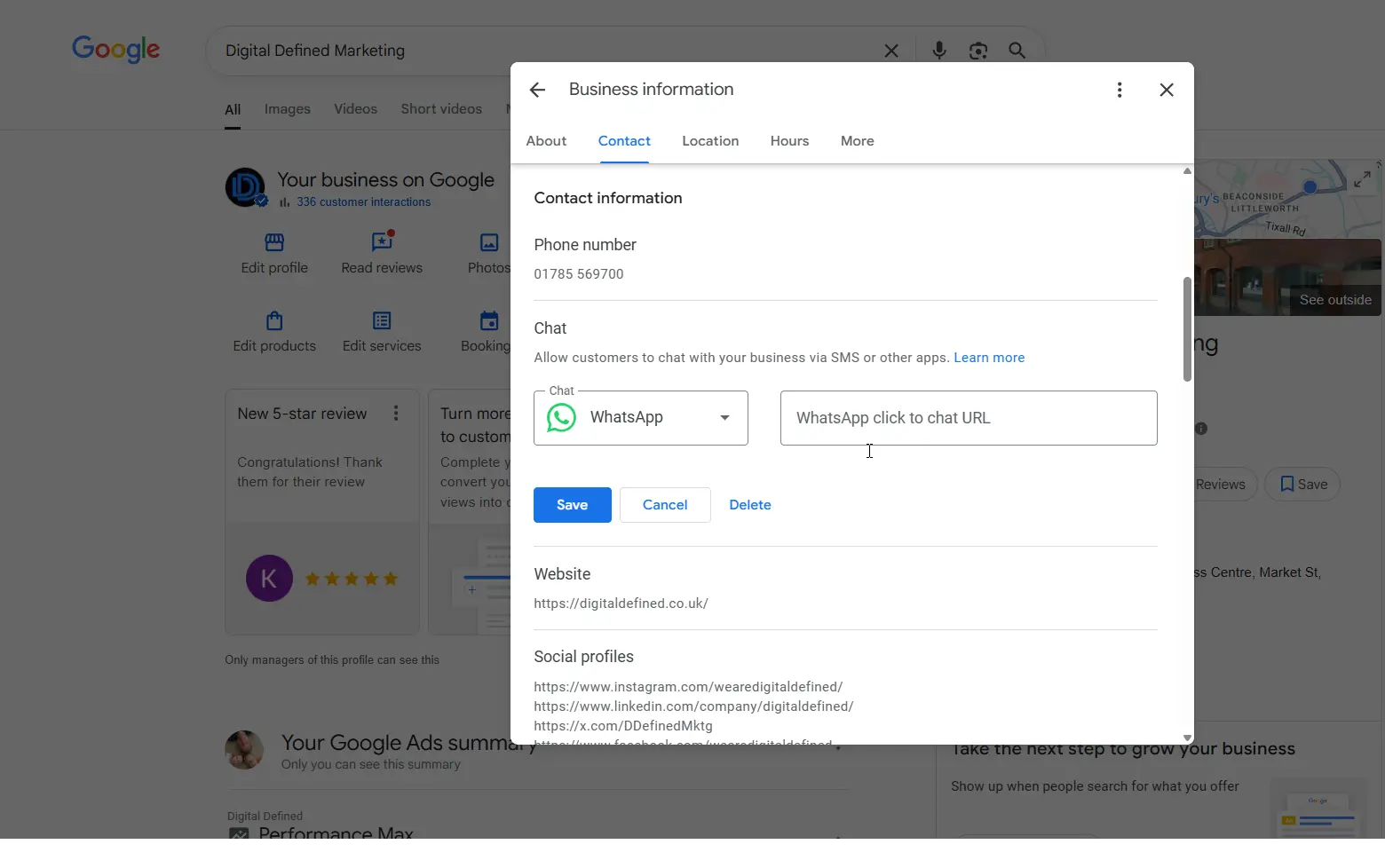
- Go to Google Business Profile Manager
- Click Edit Profile then Contact
- Under Chat, select WhatsApp
- Paste your full WhatsApp link (
https://wa.me/44...) - Click Save
Google will review the update, and it may take a few hours or days to appear on your public listing. But in truth, most of the time Google approve changes within 10 minutes.
Don’t use WhatsApp? Add a Text Message (SMS) Option Instead
You can also allow customers to text you directly via SMS. This works on mobile devices and shows up as a “Text” or “Message” button on your listing.
SMS Setup – Format:
Use this format for SMS links:
sms:+44YOURNUMBER
For example:
- ✅
sms:+447969324522 - ❌
sms:07969324522 - ❌
sms://+44 7969324522
How to Add SMS to Google Business Profile:
- Go to your Google Business Profile
- Click Edit Profile → Contact
- Under Chat, paste the SMS link
e.g.sms:+447969324522 - Save your changes
Depending on your region, you may only be able to show one messaging option (WhatsApp or SMS), but in some profiles, both are possible.
Want to Pre-Fill the Message?
You can also automatically add a line of text in the message for people too. If you want to try this, we’d suggest getting some help from our good AI friend, ChatGPT and testing it to check it works.
Use this format for WhatsApp links with pre-filled text:
https://wa.me/44YOURNUMBER?text=I'm%20interested%20in%20your%20services
➡ Example:
https://wa.me/447969324522?text=Hi%20I%27m%20interested%20in%20your%20SEO%20services
Common Pitfalls to Avoid
- Don’t use + or 0 in your number—use
44and nothing else - Consider switching your WhatsApp to a Business Account, Search “WhatsApp for business”. It’s not required but does have better features for businesses.
- Don’t add a number if you don’t check it regularly; this creates a poor experience. (Consider adding the WhatsApp app to your work computer or utilising a tool like Respond.io to share access to the wider team.
Who Should Use This Feature?
You’ll benefit most if:
- You get inbound leads via phone or form
- You want to offer an instant response without extra tech
- You already use WhatsApp or SMS as part of your sales/customer care process
Avoid if:
- You have multiple staff answering from one number with no shared inbox
- You don’t have the bandwidth to reply within a few hours, as a rule we talk about the golden hour, but we always push clients to respond to everything within 10 minutes to improve their lead-to-sale rate.
Why This Matters
This change lets you:
- Meet customers in apps they already use
- Make communication easier, and less formal.
- Allow people to share more than just text quickly.
- Skip forms and waiting
- Increase conversion rates from local search traffic
It’s part of a broader trend: Google wants search results to be actionable, not just informative.
Bonus: Combine With Google Ads or QR Codes
- Add your WhatsApp or SMS link to your Google Ads extensions
- Use a WhatsApp QR code in-store, on vans, or on packaging. In your WhatsApp for business, if you go to settings, your QR code is there ready to use.
- Add click-to-chat buttons to your website and email signature, the same link you add here, can be utilised anywhere.
Are you looking for a marketing agency to partner with?
You might also like
Having a social media presence is essential for modern businesses. Our guide will help you choose the right social media platforms for your business.

The risks of losing track of log-ins and passwords Secure digital access management is crucial for businesses of all sizes. Imagine a staff member leaves suddenly and you realise that no one else in the Read more...

You’ve probably noticed how hard it is to get people to fill in forms or pick up the phone these days. Everyone wants instant replies, or to share pictures and drawings quickly.